Table of Contents
28. Module box2d LiquidFun
LiquidFun is a 2D rigid-body and fluid simulation C++ library for games based upon Box 2D .
It provides support for procedural animation of physical bodies to make objects move and interact in realistic ways.
Discuss LiquidFun with other developers and users on the mailing list of LiquidFun.
Report issues on the issues tracker or post your questions to stackoverflow tagged with “liquidfun”.
Please take a look at LiquidFun Programmer’s Guide which is available for C++ but also applies to this wrapper over LUA
Some implementation in this wrapper is slightly different from the original version of C++.
For example, is not available the manipulation of particle buffer directly through Lua.
Next one example of what can be done with this feature:
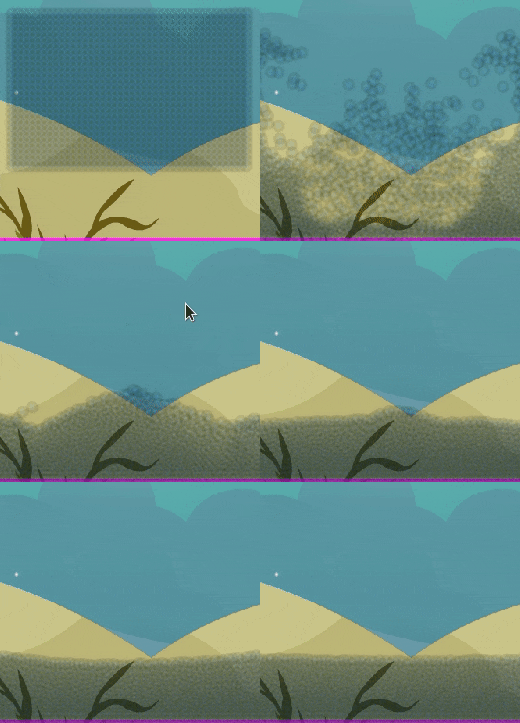
Figure 28.1 Fluid particle showcase
28.1. box2d LiquidFun Methods
The box2d liquid fun has same methods as in box2d .
28.1.1. LiquidFun createFluid
The implementation of LiquidFun is a bit different from others object in this engine.
First, a renderizable is not available for the fluid, therefore, you do not need to create a separated object which represent the fluid. All you need is to configure a texture plus some parameters and the fluid is created and the engine will take care of render it.
Two tables are the arguments needed for creating a fluid , initial physical format, and options.
Next is presented the table definition for the initial physical format (which could be an array as well):
rectanglecenterwidthheightx, y, z}valuevalue
triangleabcx, y, z}{x, y, z}{x, y, z}
circlecenterrayx, y, z}value
e.g. single table:
{
    type    = 'rectangle',
    center  = {x=0,y=0,z=0},
    width   = 600,
    height  = 400,
}

{
    type    = 'circle',
    center  = {x=0,y=0,z=0},
    ray     = 200,
}
e.g. array table:
{
    {
        type    = 'rectangle',
        center  = {x=0,y=0,z=0},
        width   = 600,
        height  = 400,
    },

    {
        type    = 'circle',
        center  = {x=0,y=0,z=0},
        ray     = 200,
    }
}
And next is presented the definition for the options table:
position
table{
x=0,y=0,z=0}
scale
table{
x=1,y=1}ray=5scale{x=2,y=2}=>ray=10
color
table{
r=1,g=1,b=1,a=1}
texture
string
#AAFF00FF
is2dScreen
boolean
falsetrueThe fluid is 2d Screen coordinatefalseThe fluid is 2d World coordinate
is3d
boolean
falsetrueThe fluid is 3d World coordinatefalseThe fluid is 2d World/Screen coordinate
segmented
boolean
falsetrueThe texture is mapped to the whole physicsfalseThe texture is mapped to a single particle
radius
number
0.5
radiusScale
number
1.01.0means no scale.This scale is only for the particle (not the physics)
damping
number
0.5
stride
number
00,0.75* particle diameter is used
strength
number
1.0
lifetime
number
0.00.0indicates an infinite life time.
angle
number
0.0
angularVelocity
number
0.0
linearVelocity
table{
x=0,y=0}
blend
string
one
operation
string
add
flags
string
water
groupFlags
string
solidParticleGroup
For the next examples, it will be used this texture:
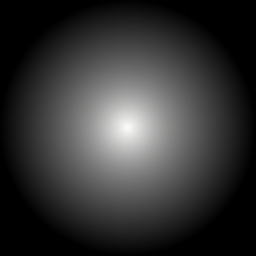
Figure 28.2 Texture for fluid particle
Example:
 require "box2dLiquidFun"
 mbm.setColor(0.6,0.6,0.6)

 tPhysic = box2dLiquidFun:new()

 tShapeGround    = shape:new('2dw',0,-200)
 tShapeLeftWall  = shape:new('2dw',-200,0)
 tShapeRightWall = shape:new('2dw',200,0)
 tShapeUpWall    = shape:new('2dw',0,200)

 tShapeGround:create('rectangle',400,20)
 tShapeRightWall:create('rectangle',20,400)
 tShapeLeftWall:create('rectangle',20,400)
 tShapeUpWall:create('rectangle',400,20)

 tPhysic:addStaticBody(tShapeGround)
 tPhysic:addStaticBody(tShapeRightWall)
 tPhysic:addStaticBody(tShapeLeftWall)
 tPhysic:addStaticBody(tShapeUpWall)

 tFluid = tPhysic:createFluid(
     {   type   = 'rectangle',
         center = {x=0,y=0,z=0},
         width  = 200, height = 400,
     },
     {   texture     ='fluid_particle.png',
         color       = {r = 0.0, g = 0.0, b =1.0},
         radiusScale = 2.0,
         flags       = "water",
         groupFlags  = {"solidParticleGroup"},
     })
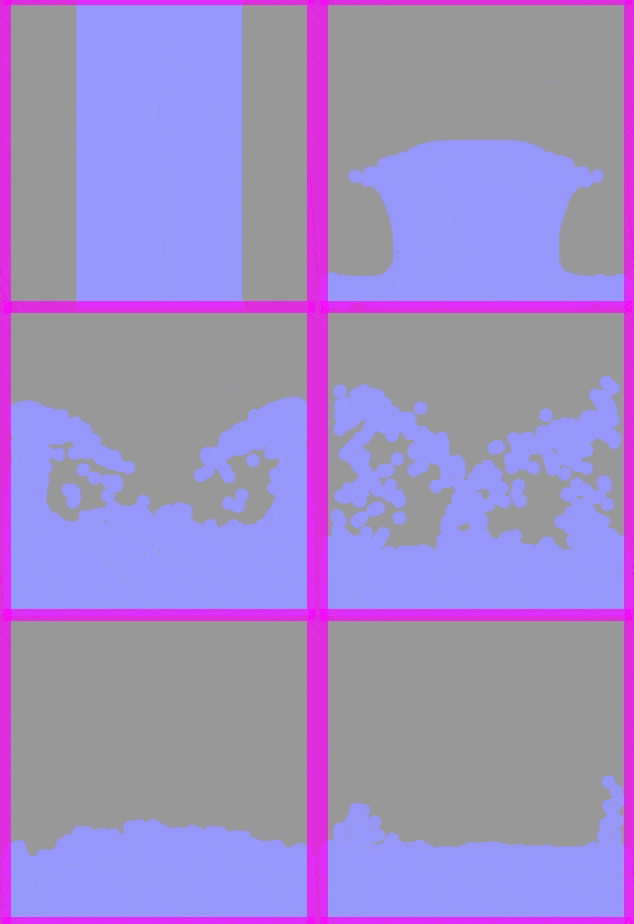
Figure 28.3 Basic example fluid box2d:LiquidFun
Tip
Example 2 no color:
 require "box2dLiquidFun"
 mbm.setColor(0.6,0.6,0.6)

 tPhysic = box2dLiquidFun:new()

 tShapeGround    = shape:new('2dw',0,-200)
 tShapeLeftWall  = shape:new('2dw',-200,0)
 tShapeRightWall = shape:new('2dw',200,0)
 tShapeUpWall    = shape:new('2dw',0,200)

 tShapeGround:create('rectangle',400,20)
 tShapeRightWall:create('rectangle',20,400)
 tShapeLeftWall:create('rectangle',20,400)
 tShapeUpWall:create('rectangle',400,20)

 tPhysic:addStaticBody(tShapeGround)
 tPhysic:addStaticBody(tShapeRightWall)
 tPhysic:addStaticBody(tShapeLeftWall)
 tPhysic:addStaticBody(tShapeUpWall)

 tFluid = tPhysic:createFluid(
     {   type   = 'rectangle',
         center = {x=0,y=0,z=0},
         width  = 200, height = 400,
     },
     {   texture     ='fluid_particle.png',
         radiusScale = 2.0,
         flags       = "water",
         groupFlags  = {"solidParticleGroup"},
     })
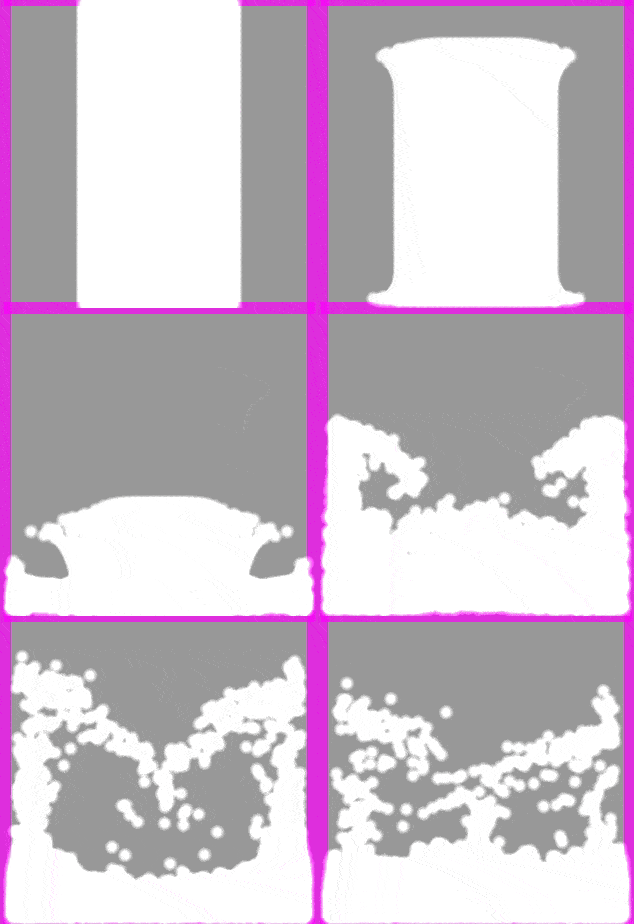
Figure 28.4 Basic example no color to texture fluid box2d:LiquidFun
Note
Example 3 array of physical shape:
 require "box2dLiquidFun"
 mbm.setColor(0.6,0.6,0.6)

 tPhysic = box2dLiquidFun:new()

 tShapeGround    = shape:new('2dw',0,-200)
 tShapeLeftWall  = shape:new('2dw',-200,0)
 tShapeRightWall = shape:new('2dw',200,0)
 tShapeUpWall    = shape:new('2dw',0,200)

 tShapeGround:create('rectangle',400,20)
 tShapeRightWall:create('rectangle',20,400)
 tShapeLeftWall:create('rectangle',20,400)
 tShapeUpWall:create('rectangle',400,20)

 tPhysic:addStaticBody(tShapeGround)
 tPhysic:addStaticBody(tShapeRightWall)
 tPhysic:addStaticBody(tShapeLeftWall)
 tPhysic:addStaticBody(tShapeUpWall)

 tFluid = tPhysic:createFluid(
 {
     {   type   = 'rectangle',
         center = {x=-50,y=0,z=0},
         width  = 50,
         height = 50,
     },
     {   type   = 'circle',
         center = {x=50,y=30,z=0},
         ray    = 50,
     },
 },
 {   texture     ='fluid_particle.png',
     flags       = "powder",
     groupFlags  = {"solidParticleGroup"},
 })
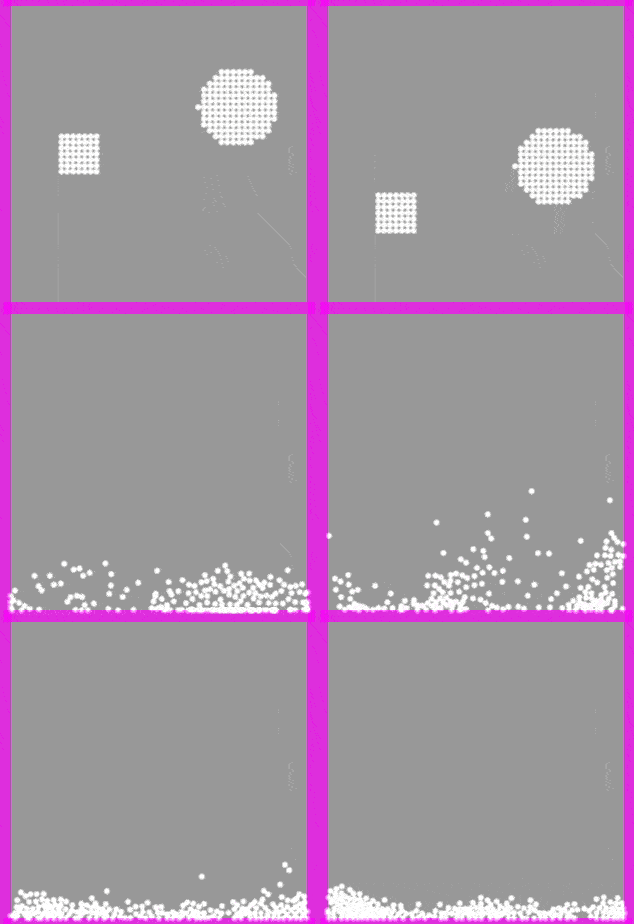
Figure 28.5 Basic example array of shape
28.1.2. LiquidFun flags
The particle flag can be combined as array.
Compatible
waterYes
zombieYes
wallYes
springYes
elasticYes
viscousYes
powderYes
tensileYes
colorMixingNo
destructionListenerNo
barrierYes
staticPressureYes
reactiveYes
repulsiveYes
28.1.3. LiquidFun group flags
The particle group flag can be combined as array.
Compatible
solidParticleGroupYes
rigidParticleGroupYes
particleGroupCanBeEmptyYes
particleGroupWillBeDestroyedYes
particleGroupNeedsUpdateDepthNo
28.1.4. LiquidFun flags examples
To exemplify how to differ the flags, see the examples bellow:
For the fluid, we will use this texture:
 require "box2dLiquidFun"
 mbm.setColor(0.6,0.6,0.6)

 tPhysic = box2dLiquidFun:new()

 tShapeGround    = shape:new('2dw',0,-200)
 tShapeLeftWall  = shape:new('2dw',-200,0)
 tShapeRightWall = shape:new('2dw',200,0)
 tShapeUpWall    = shape:new('2dw',0,200)

 tShapeGround:create('rectangle',400,20)
 tShapeRightWall:create('rectangle',20,400)
 tShapeLeftWall:create('rectangle',20,400)
 tShapeUpWall:create('rectangle',400,20)

 tPhysic:addStaticBody(tShapeGround)
 tPhysic:addStaticBody(tShapeRightWall)
 tPhysic:addStaticBody(tShapeLeftWall)
 tPhysic:addStaticBody(tShapeUpWall)

 tFluid = tPhysic:createFluid(
     {   type   = 'rectangle',
         center = {x=0,y=0,z=0},
         width  = 200,
         height = 200,
     },
     {   texture     ='fluid_particle.png',
         flags       = "water",
         groupFlags  = {"solidParticleGroup"},
     })
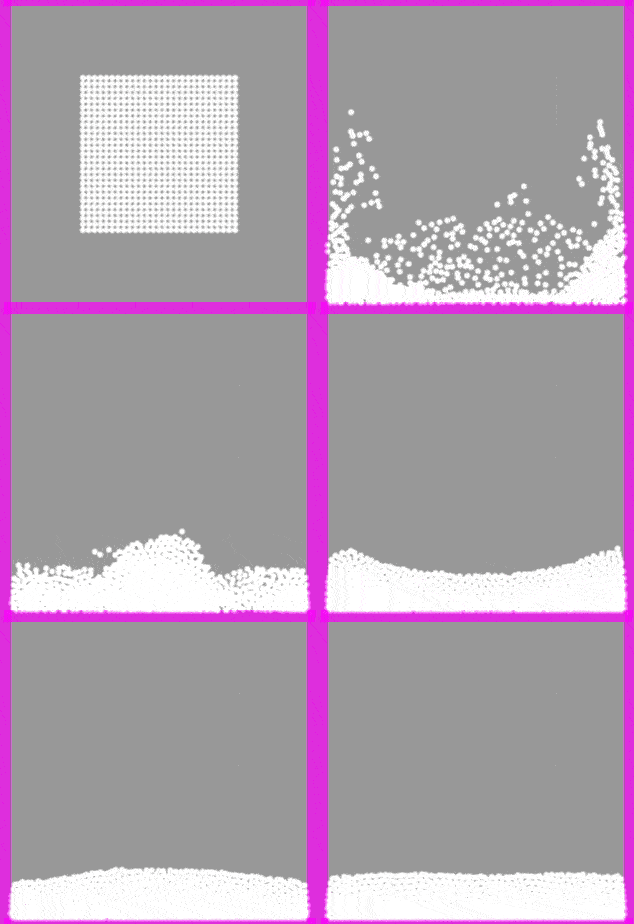
Figure 28.7 Example flags “water”
 require "box2dLiquidFun"
 mbm.setColor(0.6,0.6,0.6)

 tPhysic = box2dLiquidFun:new()

 tShapeGround    = shape:new('2dw',0,-200)
 tShapeLeftWall  = shape:new('2dw',-200,0)
 tShapeRightWall = shape:new('2dw',200,0)
 tShapeUpWall    = shape:new('2dw',0,200)

 tShapeGround:create('rectangle',400,20)
 tShapeRightWall:create('rectangle',20,400)
 tShapeLeftWall:create('rectangle',20,400)
 tShapeUpWall:create('rectangle',400,20)

 tPhysic:addStaticBody(tShapeGround)
 tPhysic:addStaticBody(tShapeRightWall)
 tPhysic:addStaticBody(tShapeLeftWall)
 tPhysic:addStaticBody(tShapeUpWall)

 tFluid = tPhysic:createFluid(
     {   type   = 'rectangle',
         center = {x=0,y=0,z=0},
         width  = 200,
         height = 200,
     },
     {   texture     ='fluid_particle.png',
         flags       = {"water","staticPressure"},
         groupFlags  = {"solidParticleGroup"},
     })
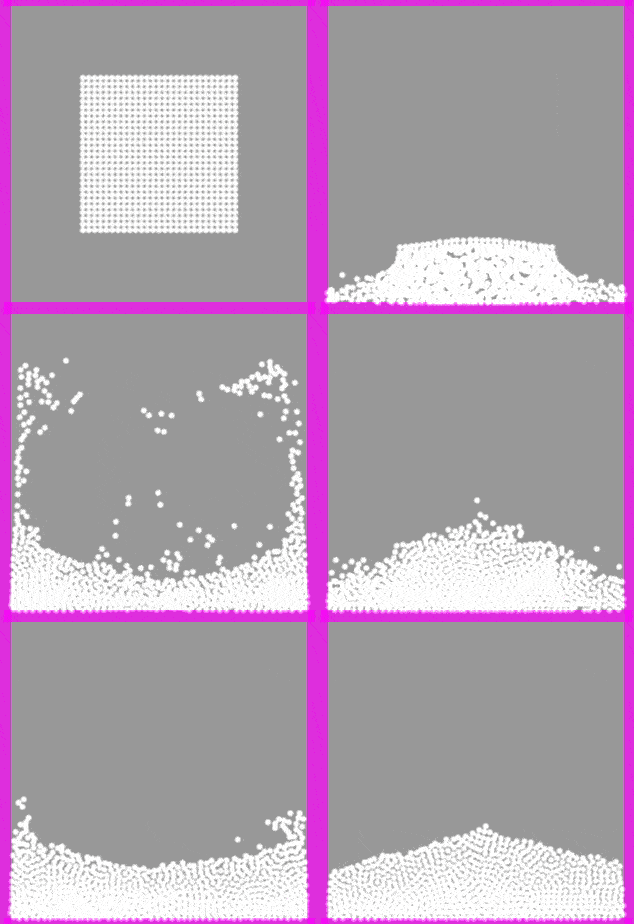
Figure 28.8 Example flags “water|staticPressure”
 require "box2dLiquidFun"
 mbm.setColor(0.6,0.6,0.6)

 tPhysic = box2dLiquidFun:new()

 tShapeGround    = shape:new('2dw',0,-200)
 tShapeLeftWall  = shape:new('2dw',-200,0)
 tShapeRightWall = shape:new('2dw',200,0)
 tShapeUpWall    = shape:new('2dw',0,200)

 tShapeGround:create('rectangle',400,20)
 tShapeRightWall:create('rectangle',20,400)
 tShapeLeftWall:create('rectangle',20,400)
 tShapeUpWall:create('rectangle',400,20)

 tPhysic:addStaticBody(tShapeGround)
 tPhysic:addStaticBody(tShapeRightWall)
 tPhysic:addStaticBody(tShapeLeftWall)
 tPhysic:addStaticBody(tShapeUpWall)

 tFluid = tPhysic:createFluid(
     {   type   = 'rectangle',
         center = {x=0,y=0,z=0},
         width  = 200,
         height = 200,
     },
     {   texture     ='fluid_particle.png',
         flags       = "elastic",
         groupFlags  = {"solidParticleGroup"},
     })
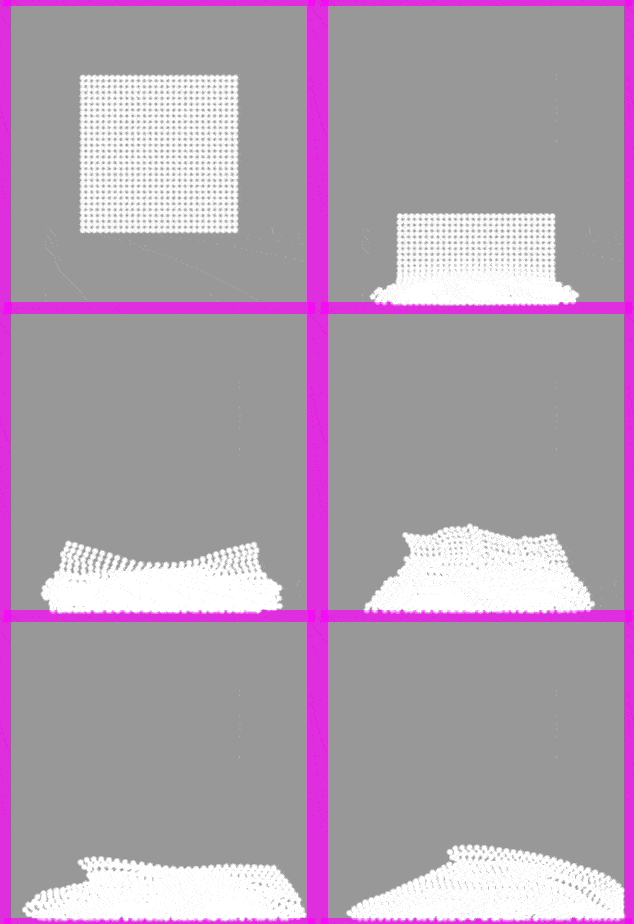
Figure 28.9 Example flags “elastic”
 require "box2dLiquidFun"
 mbm.setColor(0.6,0.6,0.6)

 tPhysic = box2dLiquidFun:new()

 tShapeGround    = shape:new('2dw',0,-200)
 tShapeLeftWall  = shape:new('2dw',-200,0)
 tShapeRightWall = shape:new('2dw',200,0)
 tShapeUpWall    = shape:new('2dw',0,200)

 tShapeGround:create('rectangle',400,20)
 tShapeRightWall:create('rectangle',20,400)
 tShapeLeftWall:create('rectangle',20,400)
 tShapeUpWall:create('rectangle',400,20)

 tPhysic:addStaticBody(tShapeGround)
 tPhysic:addStaticBody(tShapeRightWall)
 tPhysic:addStaticBody(tShapeLeftWall)
 tPhysic:addStaticBody(tShapeUpWall)

 tFluid = tPhysic:createFluid(
     {   type   = 'rectangle',
         center = {x=0,y=0,z=0},
         width  = 200,
         height = 200,
     },
     {   texture     ='fluid_particle.png',
         flags       = "viscous",
         groupFlags  = {"solidParticleGroup"},
     })
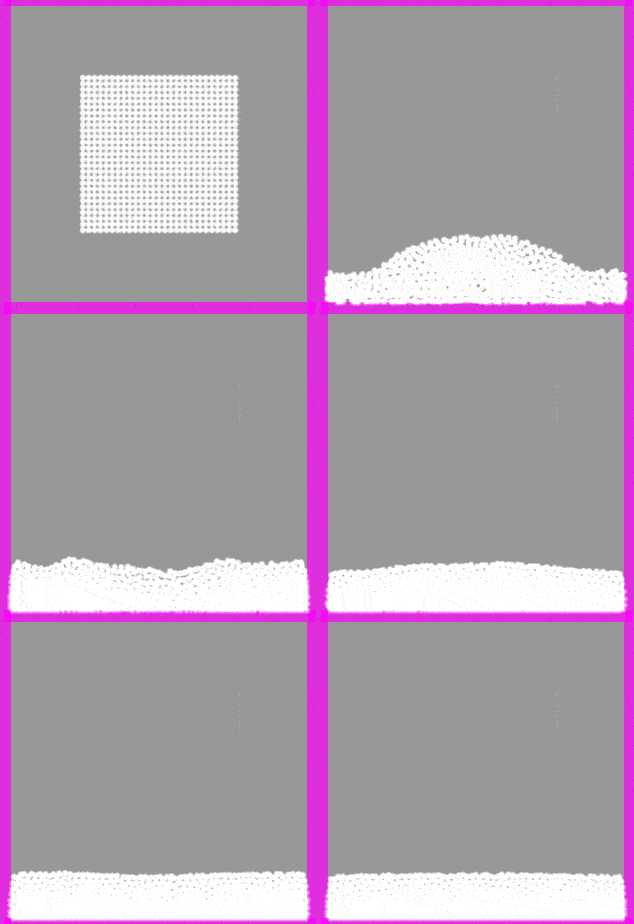
Figure 28.10 Example flags “viscous”
 require "box2dLiquidFun"
 mbm.setColor(0.6,0.6,0.6)

 tPhysic = box2dLiquidFun:new()

 tShapeGround    = shape:new('2dw',0,-200)
 tShapeLeftWall  = shape:new('2dw',-200,0)
 tShapeRightWall = shape:new('2dw',200,0)
 tShapeUpWall    = shape:new('2dw',0,200)

 tShapeGround:create('rectangle',400,20)
 tShapeRightWall:create('rectangle',20,400)
 tShapeLeftWall:create('rectangle',20,400)
 tShapeUpWall:create('rectangle',400,20)

 tPhysic:addStaticBody(tShapeGround)
 tPhysic:addStaticBody(tShapeRightWall)
 tPhysic:addStaticBody(tShapeLeftWall)
 tPhysic:addStaticBody(tShapeUpWall)

 tFluid = tPhysic:createFluid(
     {   type   = 'rectangle',
         center = {x=0,y=0,z=0},
         width  = 200,
         height = 200,
     },
     {   texture     ='fluid_particle.png',
         flags       = "powder",
         groupFlags  = {"solidParticleGroup"},
     })
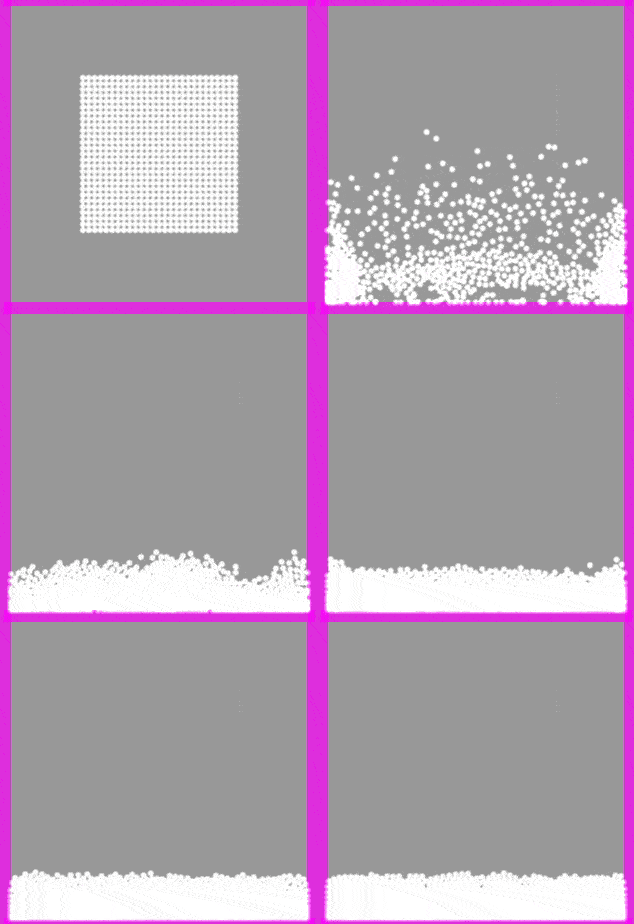
Figure 28.11 Example flags “powder”
28.2. LiquidFun methods
28.2.1. LiquidFun add particles
- add(table shape, table infoPosScale)
- Add particles given the shape. See initial physical format.Info position and scale is defined as:fieldInformation
xyzsxsyszPositionxPositionyPositionzScalexScaleyScalez- Parameters
table – shape physical format.
table – info position and scale.
- Returns
numberparticles added.
Example:
 require "box2dLiquidFun"
 mbm.setColor(0.6,0.6,0.6)

 tPhysic = box2dLiquidFun:new()

 tShapeGround    = shape:new('2dw',0,-200)
 tShapeLeftWall  = shape:new('2dw',-200,0)
 tShapeRightWall = shape:new('2dw',200,0)
 tShapeUpWall    = shape:new('2dw',0,200)

 tShapeGround:create('rectangle',400,20)
 tShapeRightWall:create('rectangle',20,400)
 tShapeLeftWall:create('rectangle',20,400)
 tShapeUpWall:create('rectangle',400,20)

 tPhysic:addStaticBody(tShapeGround)
 tPhysic:addStaticBody(tShapeRightWall)
 tPhysic:addStaticBody(tShapeLeftWall)
 tPhysic:addStaticBody(tShapeUpWall)

 tFluid = tPhysic:createFluid(
     {   type   = 'rectangle',
         center = {x=0,y=0,z=0},
         width  = 200,
         height = 200,
     },
     {   texture     ='fluid_particle.png',
         flags       = "powder",
         groupFlags  = {"solidParticleGroup"},
     })


 function onTouchDown(key,x,y)
     local x,y = mbm.to2dw(x,y)
     local tCircle =
     {
         type = 'circle',
         ray  = 20,
     }
     local infoPosScale =
     {
         x = x,
         y = y,
         sx = 1,
         sy = 1,
     }
     local iTotalParticleAdded = tFluid:add(tCircle,infoPosScale)
     print('Total particle added:',iTotalParticleAdded)

 end
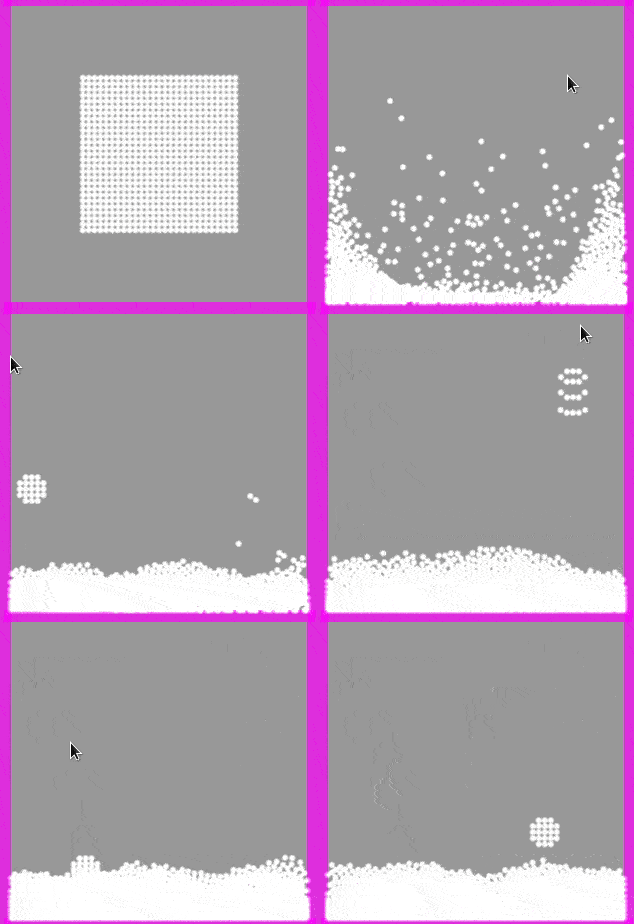
Figure 28.12 Example adding particle
28.2.2. LiquidFun particle count
- getParticleCount
Get the number of particles.
- return
numberparticles count.
Example:
 local iTotalParticle = tFluid:getParticleCount()
 print(iTotalParticle)
- getMaxParticleCount
Get the maximum number of particles.
- Returns
numbermaximum number of particles.
Example:
 local iMaxParticle = tFluid:getMaxParticleCount()
 print(iMaxParticle)
- setMaxParticleCount(number max)
- Set the maximum number of particles.By default, there is no maximum. The particle buffers can continue togrow while b2World’s block allocator still has memory.
- Parameters
number – max maximum number of particles.
Example:
tFluid:setMaxParticleCount(500)
28.2.3. LiquidFun particle color
- getColor
- Get the particle’s color.It only has effect when created with color option.
- Returns
numberred,numbergreen,numberblue,numberalpha - color of fluid.
Example:
local r,g,b,a = tFluid:getColor()
- setColor(number red, number green, number blue, number * alpha)
- Set the particle’s color.It only has effect when created with color option.
- Parameters
number – red color.
number – green color.
number – blue color.
number – alpha color (optional).
Example:
local r,g,b,a = 1.0, 0.4, 0.3, 0.9
tFluid:setColor(r,g,b,a)
- setColor(table color)
- Set the particle’s color.It only has effect when created with color option.
- Parameters
table – color
{r,g,b,a}.
Example:
local tColor = {r=1.0, g=1.0, b=0.4, a=0.3}
tFluid:setColor(tColor)
28.2.4. LiquidFun particle pause
- setPaused(boolean paused)
- Pause or unpause the particle system.When paused, b2World::Step() skips over this particle system.All b2ParticleSystem function calls still work.
- Parameters
boolean – paused value.
Example:
tFluid:setPaused(true)
28.2.5. LiquidFun particle density
- getDensity
- Get the particle density.
- Returns
numberdensity
Example:
local density = tFluid:getDensity()
- setDensity(number density)
- Change the particle density.Particle density affects the mass of the particles, which in turnaffects how the particles interact with b2Bodies. Note that the densitydoes not affect how the particles interact with each other.
- Parameters
number – density
Example:
local density = tFluid:getDensity()
tFluid:setDensity(density * 2.0)
28.2.6. LiquidFun particle gravity scale
- getGravityScale
- Get the particle gravity scale.
- Returns
numbergravity scale
Example:
local gravity_scale = tFluid:getGravityScale()
- setGravityScale(number gravity_scale)
- Change the particle gravity scale.Adjusts the effect of the global gravity vector on particles.
- Parameters
number – gravity scale
Example:
local gravity_scale = tFluid:getGravityScale()
tFluid:setGravityScale(gravity_scale * 2.0)
28.2.7. LiquidFun particle damping
- getDamping
- Get damping for particles
- Returns
numberdamping
Example:
local damping = tFluid:getDamping()
- setDamping(number damping)
- Damping is used to reduce the velocity of particles.The damping parameter can be larger than
1.0but the dampingeffect becomes sensitive to the time step when the damping parameter is large.- Parameters
number – damping
Example:
tFluid:setDamping(0.5)
28.2.8. LiquidFun particle static pressure
Change the number of iterations when calculating the static pressure ofparticles. By default,8iterations. You can reduce the number ofiterations down to1in some situations, but this may causeinstabilities when many particles come together. If you see particlespopping away from each other like popcorn, you may have to increase thenumber of iterations.For a description of static pressure, see
- getStaticPressureIterations
- Get the number of iterations for static pressure of particles.
- Returns
numberiterations for static pressure of particles
Example:
local iterations = tFluid:getStaticPressureIterations()
- setStaticPressureIterations(number iterations)
- Parameters
number – iterations
Example:
tFluid:setStaticPressureIterations(3)
28.2.9. LiquidFun particle radius
The radius is defined in the moment of creation of fluid.
- getRadius
- Get the particle radius.
- Returns
numberparticle radius
Example:
local radius = tFluid:getRadius()
28.2.10. LiquidFun particle life time
All particules are created with0.0lifetime (infinite lifetime).A value >0.0is returned if the particle is scheduled to bedestroyed in the future, values <=0.0indicate the particle has aninfinite lifetime.
- getParticleLifetime(number index)
- Get the lifetime (in seconds) of a particle relative to the current time.
- Parameters
number – index of particle (1 based).
- Returns
numberlifetime
Example:
local index = 1 -- first particle in the system
local lifetime = tFluid:getParticleLifetime(index)
- setParticleLifetime(number index, number lifetime)
- Set the lifetime (in seconds) of a particle relative to the current time.A lifetime of less than or equal to 0.0f results in the particleliving forever until it’s manually destroyed by the application.
- Parameters
number – index of particle (1 based).
number – lifetime of particle in seconds.
Example:
local index = 1 -- first particle in the system
local lifetime = 2.0
tFluid:setParticleLifetime(index,lifetime)
28.2.11. LiquidFun destroy particles
- destroyParticle(number index)
- Destroy a particle.The particle is removed after the next simulation step (see b2World::Step()).
- Parameters
number – index of particle (1 based).
Example:
local index = 1 -- first particle in the system
tFluid:destroyParticle(index)
- destroyParticlesInShape(table shape)
- Destroy particles inside a shape without enabling the destruction callback for destroyed particles.This function is locked during callbacks.For more information see DestroyParticleInShape(const b2Shape&, const b2Transform&,bool).
- Parameters
table – shape which encloses particles that should be destroyed.
Example:
 local tShapeRect     = {type   = 'rectangle',
                         width  = 100,
                         height = 100,
                         x = 0, y =0, angle = 0}
 tFluid:destroyParticlesInShape(tShapeRect)

 local tShapeCircle   = {type = 'circle',
                         ray  = 30,
                         x = 0, y =0, angle = 0}
 tFluid:destroyParticlesInShape(tShapeCircle)

 local tShapeTriangle = {type = 'triangle',
                         a = {x = -20, y = -20},
                         b = {x =  20, y = -20},
                         c = {x =  20, y =  20},
                         x = 0, y =0, angle = 0}
 tFluid:destroyParticlesInShape(tShapeTriangle)
Note
The position x, y and the angle are available for any type of shape.
- destroyParticlesInShape(renderizable body)
- Destroy particles inside a shape without enabling the destruction callback for destroyed particles.This function is locked during callbacks.For more information see DestroyParticleInShape(const b2Shape&, const b2Transform&,bool).
- Parameters
renderizable – body which encloses particles that should be destroyed.
Example:
local tObj -- previously loaded
tFluid:destroyParticlesInShape(tObj)
28.2.12. LiquidFun particles impulse
- particleApplyLinearImpulse([table | array] tImpulse)
- Apply an impulse to one particle. This immediately modifies the velocity. Similar to b2Body::applyLinearImpulse.
- Parameters
table –
{x,y,index}the impulse info for each particle (or array).
Example:
local tImpulse = {x = 100, y = 25, index = 1}
tFluid:particleApplyLinearImpulse(tImpulse)

local tArraysImpulse = {{x = 100, y = 25, index = 1},{x = 100, y = 25, index = 2},{x = 100, y = 25, index = 3}}
tFluid:particleApplyLinearImpulse(tArraysImpulse)
- applyLinearImpulse(number firstIndex, number lastIndex, number x, number y)
- Apply an impulse to all particles between ‘firstIndex’ and ‘lastIndex’.This immediately modifies the velocity.Note that the impulse is applied to the total mass of all particles. So,calling particleApplyLinearImpulse(0, impulse) and particleApplyLinearImpulse(1, impulse)will impart twice as much velocity as calling just applyLinearImpulse(0, 1, impulse).
- Parameters
number –
firstIndex(1 based)number –
lastIndex(1 based)number –
ximpulsenumber –
yimpulse
Example:
local firstIndex = 1
local lastIndex  = 250
local x,y = 100, 25
tFluid:applyLinearImpulse(firstIndex,lastIndex,x,y)
28.2.13. LiquidFun particles force
- particleApplyForce([table | array] tForce)
- Apply a force to the center of a particle.The world force vector is usually in Newtons (N).
- Parameters
table –
{x,y,index}the force info for each particle (or array).
Example:
local tForce = {x = 50, y = 33, index = 1}
tFluid:particleApplyForce(tForce)

local tArrayForce = {{x = 50, y = 33, index = 1},{x = 50, y = 33, index = 2},{x = 50, y = 33, index = 3}}
tFluid:particleApplyForce(tArrayForce)
- applyForce(number firstIndex, number lastIndex, number x, number y)
- Distribute a force across several particles.The particles must not be wall particles.Note that the force is distributed across all the particles, so callingthis function for indices 0..N is not the same ascalling particleApplyForce(i, force) for i in 0..N.
- Parameters
number –
firstIndex(1 based)number –
lastIndex(1 based)number –
xforcenumber –
yforce
Example:
local firstIndex = 1
local lastIndex  = 300
local fx,fy = 50, 33
tFluid:applyForce(firstIndex,lastIndex,fx,fy)
28.2.14. LiquidFun particles colision
- queryAABB(number lowerBound_x, number lowerBound_y, number upperBound_x, number upperBound_y, function onQueryAABBB)
Perform a AABB algorithm collision for all objects given the bound.
The callback is called in case of collision.
It has to have the following signature:
function onQueryAABBB(tFluid, indexParticle)

end
Example:
-- TODO
- queryShapeAABB(table shape, function onQueryShapeAABB)
Perform a AABB algorithm collision for all objects given the shape.
The callback is called in case of collision.
It has to have the following signature:
function onQueryShapeAABB(tFluid, indexParticle)

end
The shape is defined as:
rectanglewidthheightxyanglevaluevaluex positiony positionradian
triangleabcxyanglex, y}{x, y}{x, y}x positiony positionradian
circlerayxyanglevaluex positiony positionradian
Example:
-- TODO
- queryShapeAABB(table renderizable, function onQueryShapeAABB)
Perform a AABB algorithm collision for all objects given the renderizable.
The callback is called in case of collision.
It has to have the following signature:
function onQueryShapeAABB(tFluid, indexParticle)

end
Example:
-- TODO
28.2.15. LiquidFun particles compute bounds
- computeAABB(number lowerBound_x, number lowerBound_y, number upperBound_x, number upperBound_y)
- Compute the axis-aligned bounding box for all particles contained within this particle system.Returns the axis-aligned bounding box of the system.
- Parameters
number – lowerBound_x
number – lowerBound_y
number – upperBound_x
number – upperBound_y
- Returns
table{lowerBound = {x,y},upperBound = {x,y}}
Example:
local lowerBound_x = 0
local lowerBound_y = 0
local upperBound_x = 100
local upperBound_y = 100
local tBound = tFluid:computeAABB(lowerBound_x,lowerBound_y,upperBound_x,upperBound_y)
print(tBound.lowerBound.x)
print(tBound.lowerBound.y)
print(tBound.upperBound.x)
print(tBound.upperBound.y)
28.2.16. LiquidFun particles ray cast
- rayCast(number x_start, number y_start, number x_end, number y_end, function onRayCastCallBack)
- Parameters
number – x start point of the ray-cast.
number – y start point of the ray-cast.
number – x end point of the ray-cast.
number – y end point of the ray-cast.
function – call back function ray-cast.
--Ray cast callback
function onRayCast(index,x,y,nx,ny,fraction)

    message = string.format('Particle: %d, at x:%g y:%g   normal nx:%g ny:%g    fraction:%g',index,x,y,nx,ny,fraction)
    print(message)
    return fraction --if you return 0 it means end of ray-cast
end